z-fighting

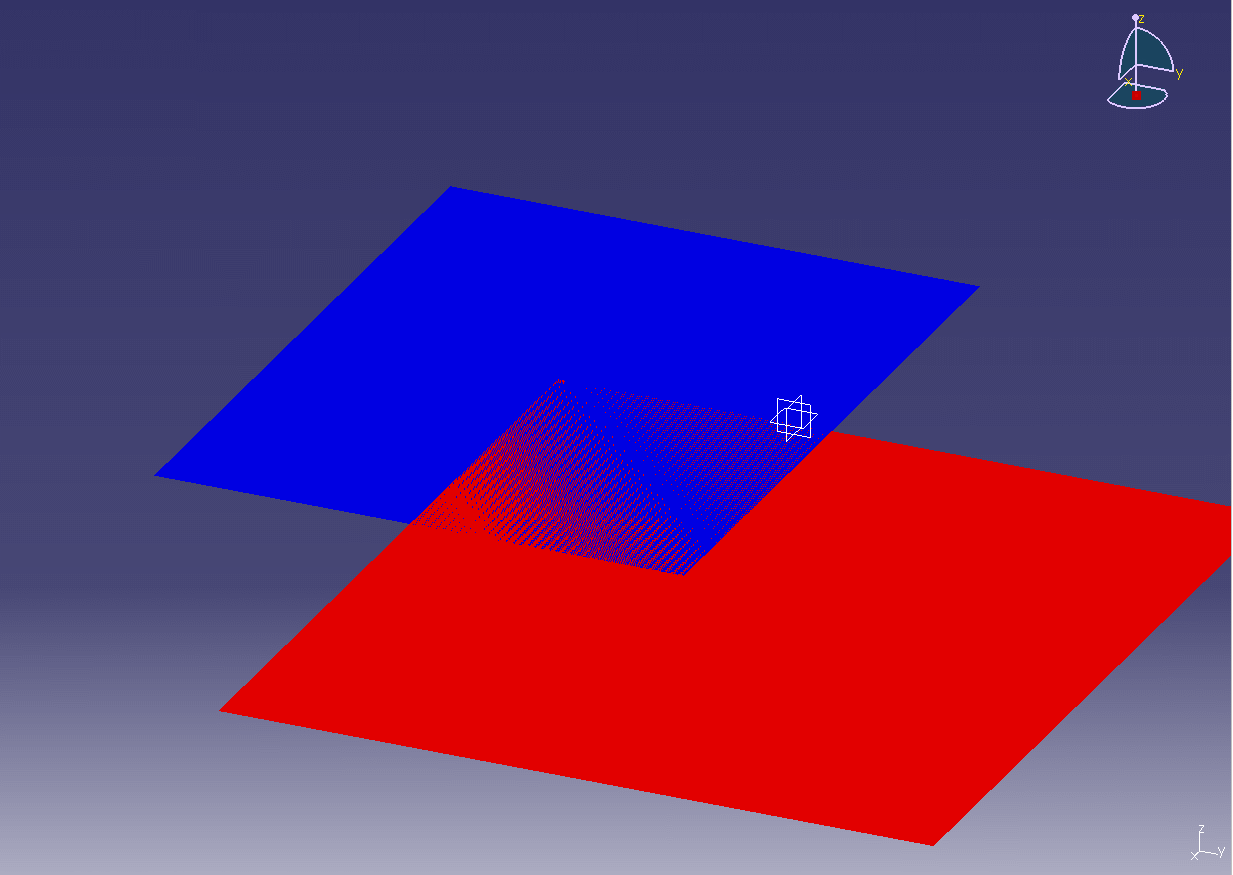
Z-fighting, also called stitching, is a phenomenon in 3D rendering that occurs when two or more primitives have similar values in the z-buffer. This problem is usually caused by limited sub-pixel precision and floating point and fixed point round-off errors.

The more z-buffer precision one uses, the less likely it is that z-fighting will be encountered. But for coplanar polygons, the problem is inevitable unless corrective action is taken.

As the distance between near and far clip planes increases, and in particular the near plane is selected near the eye, the greater the likelihood exists that z-fighting between primitives will occur.

Z-fighting can be reduced through the use of a higher resolution depth buffer, by z-buffering in some scenarios, or by simply moving the polygons further apart.

Z-fighting that is caused by insufficient precision in the depth buffer can be resolved by simply reducing the visible distance in the world. This reduces the distance between the near and far planes and solves the precision issue.

Another technique that is utilized to reduce or completely eliminate Z-fighting is switching to a logarithmic Z-buffer, reversing Z. This technique is seen in the game Grand Theft Auto V. Due to the way they are encoded, floating-point numbers have much more precision when closer to 0. Here, reversing Z leads to more precision when storing the depth of very distant objects, hence greatly reducing Z-fighting.

https://en.wikipedia.org/wiki/Z-fighting
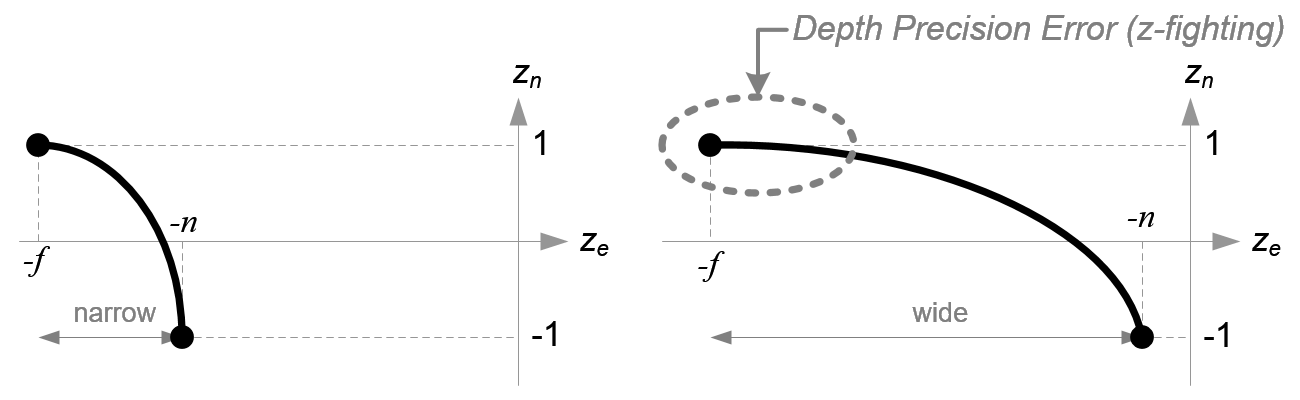
Comparison of depth precision

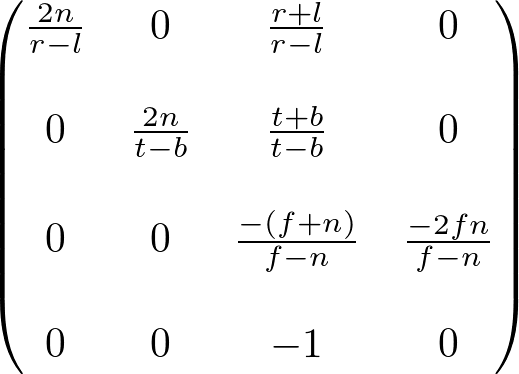
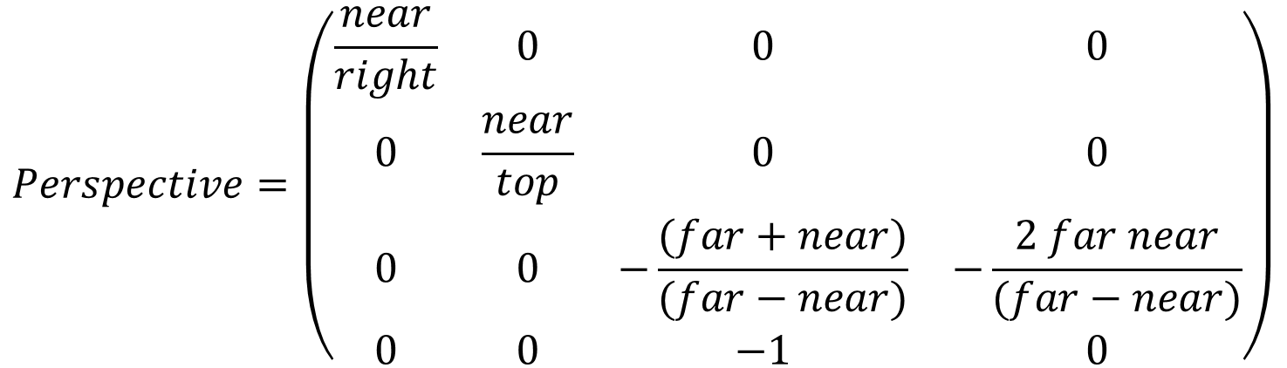
There is very high precision at the near plane, but very little precision at the far plane. If the range [-n, -f] is getting larger, it causes a depth precision problem (z-fighting); a small change of ze around the far plane does not affect on zn value. The distance between n and f should be short as possible to minimize the depth buffer precision problem.

http://www.songho.ca/opengl/gl_projectionmatrix.html


Depth Precision Visualized | NVIDIA Developer https://developer.nvidia.com/content/depth-precision-visualized

Graphing Depth Maps

reversed-ZGraphing Depth Maps

Projection Matrix

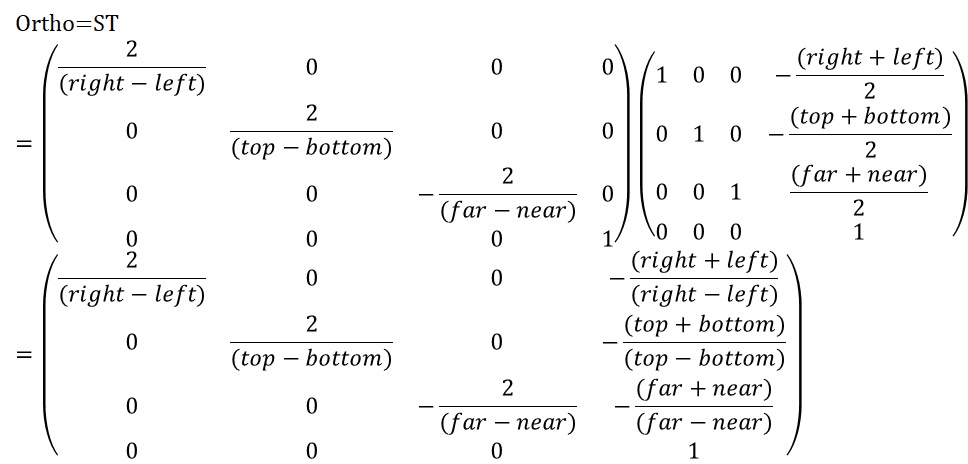
Orthographic Projection

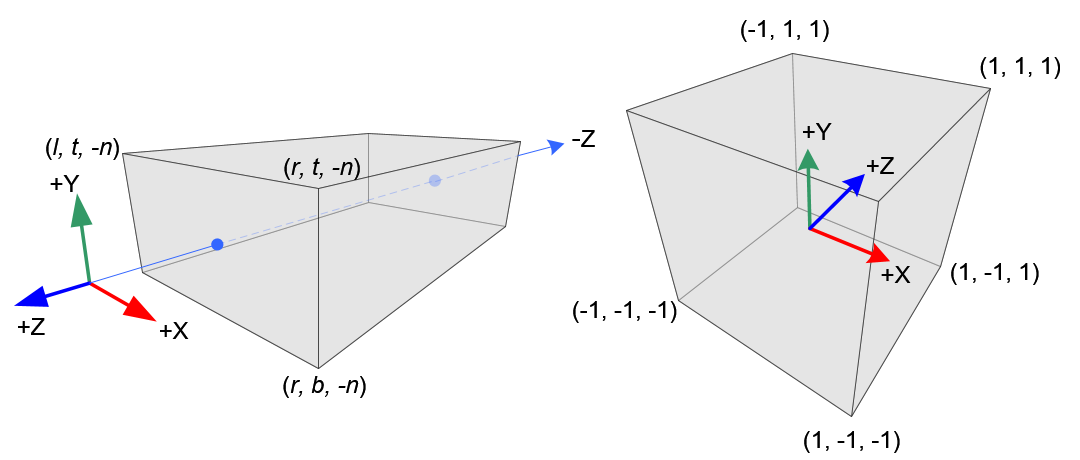
OpenGL Orthographic Volume and NDC

template <typename T>
 GLM_FUNC_QUALIFIER tmat4x4<T, defaultp> ortho
 (
  T left,
  T right,
  T bottom,
  T top,
  T zNear,
  T zFar
 )
 {
  tmat4x4<T, defaultp> Result(1);
  Result[0][0] = static_cast<T>(2) / (right - left);
  Result[1][1] = static_cast<T>(2) / (top - bottom);
  Result[2][2] = - static_cast<T>(2) / (zFar - zNear);
  Result[3][0] = - (right + left) / (right - left);
  Result[3][1] = - (top + bottom) / (top - bottom);
  Result[3][2] = - (zFar + zNear) / (zFar - zNear);
  return Result;
 }

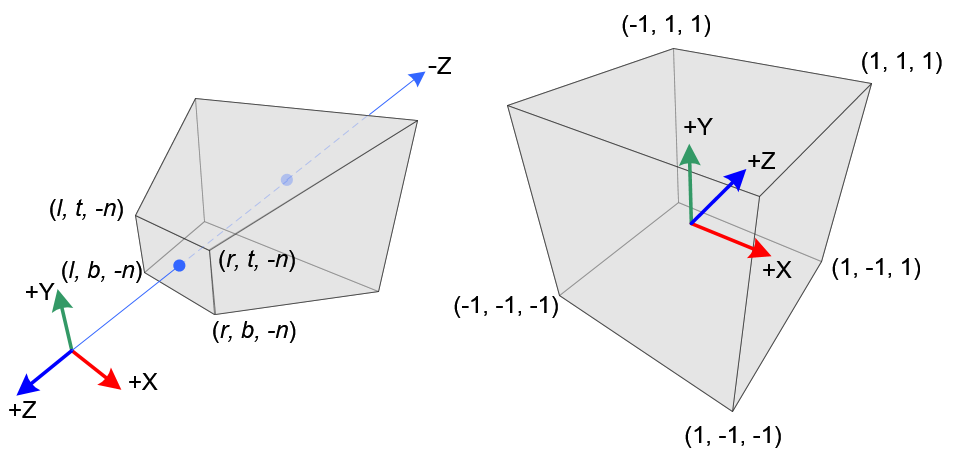
Perspective Projection

 template <typename T>
 GLM_FUNC_QUALIFIER tmat4x4<T, defaultp> frustum
 (
  T left,
  T right,
  T bottom,
  T top,
  T nearVal,
  T farVal
 )
 {
  tmat4x4<T, defaultp> Result(0);
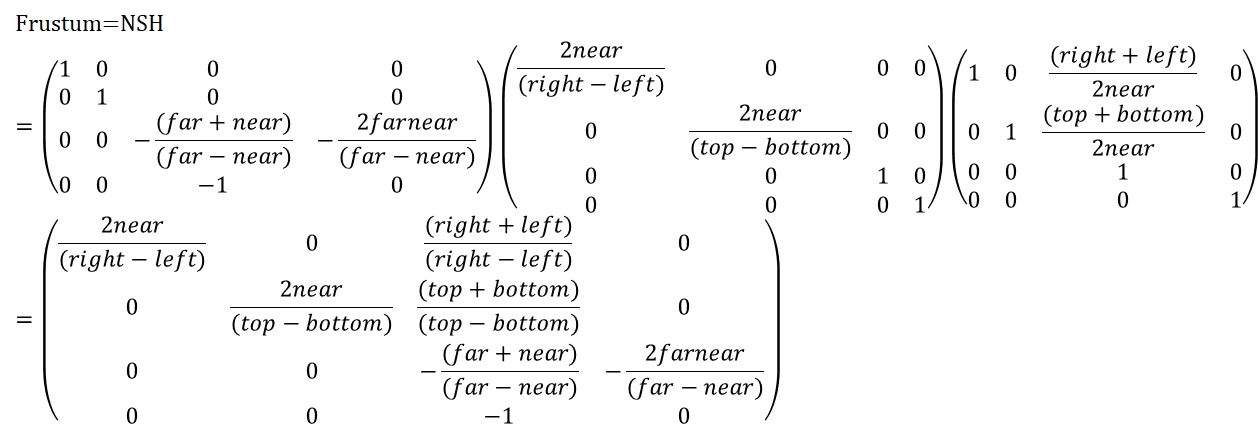
  Result[0][0] = (static_cast<T>(2) * nearVal) / (right - left);
  Result[1][1] = (static_cast<T>(2) * nearVal) / (top - bottom);
  Result[2][0] = (right + left) / (right - left);
  Result[2][1] = (top + bottom) / (top - bottom);
  Result[2][2] = -(farVal + nearVal) / (farVal - nearVal);
  Result[2][3] = static_cast<T>(-1);
  Result[3][2] = -(static_cast<T>(2) * farVal * nearVal) / (farVal - nearVal);
  return Result;
 }

OpenGL Perspective Projection Matrix

http://www.songho.ca/opengl/gl_projectionmatrix.html

mat4 projectionMatrix = glm::perspective (float fovy, float aspect, float near, float far) fovy radian

top = tan(fovy/2) * near

right = top * aspect

projectionMatrix = glm::frustum(-right, right, -top, top, near, far)

LookAt

template <typename T, precision P>
GLM_FUNC_QUALIFIER tmat4x4<T, P> lookAt(tvec3<T, P> const & eye, tvec3<T, P> const & center, tvec3<T, P> const & up)
{
# if GLM_COORDINATE_SYSTEM == GLM_LEFT_HANDED
return lookAtLH(eye, center, up);
# else
return lookAtRH(eye, center, up);
# endif
}

template <typename T, precision P>
GLM_FUNC_QUALIFIER tmat4x4<T, P> lookAtRH
(
tvec3<T, P> const & eye,
tvec3<T, P> const & center,
tvec3<T, P> const & up
)
{
tvec3<T, P> const f(normalize(center – eye));
tvec3<T, P> const s(normalize(cross(f, up)));
tvec3<T, P> const u(cross(s, f));

tmat4x4<T, P> Result(1);
Result[0][0] = s.x;
Result[1][0] = s.y;
Result[2][0] = s.z;
Result[0][1] = u.x;
Result[1][1] = u.y;
Result[2][1] = u.z;
Result[0][2] =-f.x;
Result[1][2] =-f.y;
Result[2][2] =-f.z;
Result[3][0] =-dot(s, eye);
Result[3][1] =-dot(u, eye);
Result[3][2] = dot(f, eye);
return Result;
}

template <typename T, precision P>
GLM_FUNC_QUALIFIER tmat4x4<T, P> lookAtLH
(
tvec3<T, P> const & eye,
tvec3<T, P> const & center,
tvec3<T, P> const & up
)
{
tvec3<T, P> const f(normalize(center – eye));
tvec3<T, P> const s(normalize(cross(up, f)));
tvec3<T, P> const u(cross(f, s));

tmat4x4<T, P> Result(1);
Result[0][0] = s.x;
Result[1][0] = s.y;
Result[2][0] = s.z;
Result[0][1] = u.x;
Result[1][1] = u.y;
Result[2][1] = u.z;
Result[0][2] = f.x;
Result[1][2] = f.y;
Result[2][2] = f.z;
Result[3][0] = -dot(s, eye);
Result[3][1] = -dot(u, eye);
Result[3][2] = -dot(f, eye);
return Result;
}

Unity Quaternion.LookRotation

transform.LookAt()과 Quaternion.LookRotation()는 기능적으로 “오브젝트가 특정 방향(또는 목표 지점)을 향하도록 하는 회전”을 정의한다는 점에서는 동일한 개념이나, transform.LookAt() 메서드는 목표지점을 바라보도록 오브젝트를 회전, Quaternion.LookRotation() 메서드는 해당 회전을 나타내는 쿼터니언을 생성.


Vector3 targetDir = target.position - transform.position;
Quaternion targetRot = Quaternion.LookRotation(targetDir);
transform.rotation = targetRot;

transform.LookAt(target);
// 는 아래와 같음
transform.rotation = Quaternion.LookRotation(target.position - transform.position, Vector3.up);

void LookAt(Vector3 worldPosition, Vector3 worldUp = Vector3::up)
{
Vector3 forward = worldPosition - GetPosition();
Quaternion rot = Quaternion::LookRotation(forward, worldUp);
SetRotation(rot);
}

public static Quaternion LookRotation(Vector3 forward, [DefaultValue("Vector3.up")] Vector3 upwards)
{
return Quaternion.INTERNAL_CALL_LookRotation(ref forward, ref upwards);
}
[ExcludeFromDocs]
public static Quaternion LookRotation(Vector3 forward)
{
Vector3 up = Vector3.up;
return Quaternion.INTERNAL_CALL_LookRotation(ref forward, ref up);
}

// from http://answers.unity3d.com/questions/467614/what-is-the-source-code-of-quaternionlookrotation.html
private static Quaternion INTERNAL_CALL_LookRotation(ref Vector3 forward, ref Vector3 up)
{

forward = Vector3.Normalize(forward);
Vector3 right = Vector3.Normalize(Vector3.Cross(up, forward));
up = Vector3.Cross(forward, right);
var m00 = right.x;
var m01 = right.y;
var m02 = right.z;
var m10 = up.x;
var m11 = up.y;
var m12 = up.z;
var m20 = forward.x;
var m21 = forward.y;
var m22 = forward.z;

float num8 = (m00 + m11) + m22;
var quaternion = new Quaternion();
if (num8 > 0f)
{
var num = (float)Math.Sqrt(num8 + 1f);
quaternion.w = num * 0.5f;
num = 0.5f / num;
quaternion.x = (m12 - m21) * num;
quaternion.y = (m20 - m02) * num;
quaternion.z = (m01 - m10) * num;
return quaternion;
}
if ((m00 >= m11) && (m00 >= m22))
{
var num7 = (float)Math.Sqrt(((1f + m00) - m11) - m22);
var num4 = 0.5f / num7;
quaternion.x = 0.5f * num7;
quaternion.y = (m01 + m10) * num4;
quaternion.z = (m02 + m20) * num4;
quaternion.w = (m12 - m21) * num4;
return quaternion;
}
if (m11 > m22)
{
var num6 = (float)Math.Sqrt(((1f + m11) - m00) - m22);
var num3 = 0.5f / num6;
quaternion.x = (m10 + m01) * num3;
quaternion.y = 0.5f * num6;
quaternion.z = (m21 + m12) * num3;
quaternion.w = (m20 - m02) * num3;
return quaternion;
}
var num5 = (float)Math.Sqrt(((1f + m22) - m00) - m11);
var num2 = 0.5f / num5;
quaternion.x = (m20 + m02) * num2;
quaternion.y = (m21 + m12) * num2;
quaternion.z = 0.5f * num5;
quaternion.w = (m01 - m10) * num2;
return quaternion;
}

Euler vs Quaternion Interpolation

// Vector3.Lerp – linear interpolation
euler3 = Vector3.Lerp(euler1, euler2, alpha);
cube1.transform.rotation = Quaternion.Euler(euler3);
// Quaternion.Slerp – quaternion spherical linear interpolation
quat3 = Quaternion.Slerp(quat1, quat2, alpha);
cube2.transform.rotation = quat3;