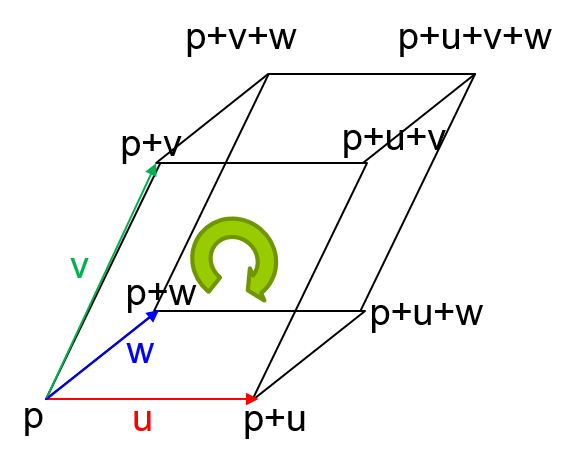
Midterm 시험
2026/10/19(월) 10:00-11:30
장소: 2공 521호
시험범위: 처음부터-배운데까지
Affine Space
Affine Space (아핀공간) – 벡터공간에 점을 추가한 공간
http://mathworld.wolfram.com/AffineSpace.html
벡터와 벡터 간의 덧셈/뺄셈 -> 벡터 생성
스칼라와 벡터의 곱셈/나눗셈 -> 벡터 생성
벡터와 점의 덧셈/뺄셈 -> 점 생성
점과 점 간의 뺄셈 -> 벡터 생성
점과 점 간의 덧셈은 허용되지 않는다.
아핀공간에서 점의 덧셈은 각 점들 앞의 계수의 합이 1일 때에만 허용되고 이처럼 계수의 합이 1이 되는 경우를 Affine Sum(아핀합)이라 한다.
Homogeneous Coordinate (동차좌표) – 어떤 목적을 위해 한 차원의 좌표(n)을 추가한 좌표 (n+1)로 표현을 하는 것
http://mathworld.wolfram.com/HomogeneousCoordinates.html
4차원 동차 좌표 (x,y,z,w) => 3차원 좌표 (x/w , y/w , z/w)
만약 w == 1, (x,y,z,1)은 position이다.
만약 w == 0, (x,y,z,0)은 vector이다.
lecture6
lecture6
lecture6-appendixBC
The spherical polar coordinate system
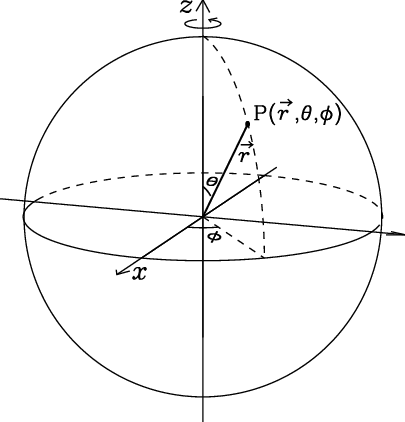
Spherical Coordinates — from Wolfram MathWorld
theta to be the azimuthal angle in the xy-plane from the x-axis with 0<=theta<2pi (denoted lambda when referred to as the longitude)
phi to be the polar angle (also known as the zenith angle and colatitude, with phi=90 degrees-delta where delta is the latitude) from the positive z-axis with 0<=phi<=pi
r to be distance (radius) from a point to the origin.
How to convert the mouse position to world space in Unity (2D + 3D)
Unity Camera.ScreenPointToRay
Unity – Scripting API: Camera.ScreenPointToRay (unity3d.com)
Camera 클래스의 ScreenPointToRay 함수는 스크린 좌표를 카메라에서 시작하여 스크린 좌표에 해당하는 3차원의 좌표로 Ray를 생성해줌.
void Update()
{
        ray = Camera.main.ScreenPointToRay(Input.mousePosition);
        RaycastHit hitData;

        if(Physics.Raycast(ray, out hitData, 1000))
        {
                worldPosition = hitData.point;
        }
}Unity Camera.ScreenToWorldPoint
Unity – Scripting API: Camera.ScreenToWorldPoint (unity3d.com)
Camera 클래스의 ScreenToWorldPoint 함수는 스크린 좌표를 카메라가 찍고있는 3차원의 좌표로 바꿔줌.
void OnGUI()
{
        Vector3 point = new Vector3();
        Event   currentEvent = Event.current;
        Vector3 mousePos = new Vector3();

        // Get the mouse position from Event.
        // Note that the y position from Event is inverted. (GUI space -> Screen space)
        mousePos.x = currentEvent.mousePosition.x;
        mousePos.y = Camera.main.pixelHeight - currentEvent.mousePosition.y;
        mousePos.z = Camera.main.nearClipPlane;
        point = Camera.main.ScreenToWorldPoint(mousePos);

        GUILayout.BeginArea(new Rect(20, 20, 250, 120));
        GUILayout.Label("Screen pixels: " + cam.pixelWidth + ":" + cam.pixelHeight);
        GUILayout.Label("Mouse position: " + mousePos);
        GUILayout.Label("World position: " + point.ToString("F3"));
        GUILayout.EndArea();
}
KeyboadMouseInput
Input
lecture5
lecture5
Parallelepiped